
HyperDBを使うと真っ白な画面になる



WordPressの冗長化のプラグインで有名なHyperDB。今回このプラグインを使うと画面が真っ白になりました。
構成
- Webサーバー:apache2.4、php7
- DBサーバー×2:Mariadb
DBサーバー2台はレプリケーションの設定が終わっている前提となります。プラグインをダウンロードしてファイルを書き換えをします。
db-config.php
[php]
<?php /** * HyperDB configuration file * * This file should be installed at ABSPATH/db-config.php * * $wpdb is an instance of the hyperdb class which extends the wpdb class. * * See readme.txt for documentation. */ /** * Introduction to HyperDB configuration * * HyperDB can manage connections to a large number of databases. Queries are * distributed to appropriate servers by mapping table names to datasets. * * A dataset is defined as a group of tables that are located in the same * database. There may be similarly-named databases containing different * tables on different servers. There may also be many replicas of a database * on different servers. The term "dataset" removes any ambiguity. Consider a * dataset as a group of tables that can be mirrored on many servers. * * Configuring HyperDB involves defining databases and datasets. Defining a * database involves specifying the server connection details, the dataset it * contains, and its capabilities and priorities for reading and writing. * Defining a dataset involves specifying its exact table names or registering * one or more callback functions that translate table names to datasets. */ /** Variable settings **/ /** * save_queries (bool) * This is useful for debugging. Queries are saved in $wpdb->queries. It is not
* a constant because you might want to use it momentarily.
* Default: false
*/
$wpdb->save_queries = false;
/**
* persistent (bool)
* This determines whether to use mysql_connect or mysql_pconnect. The effects
* of this setting may vary and should be carefully tested.
* Default: false
*/
$wpdb->persistent = false;
/**
* max_connections (int)
* This is the number of mysql connections to keep open. Increase if you expect
* to reuse a lot of connections to different servers. This is ignored if you
* enable persistent connections.
* Default: 10
*/
$wpdb->max_connections = 10;
/**
* check_tcp_responsiveness
* Enables checking TCP responsiveness by fsockopen prior to mysql_connect or
* mysql_pconnect. This was added because PHP's mysql functions do not provide
* a variable timeout setting. Disabling it may improve average performance by
* a very tiny margin but lose protection against connections failing slowly.
* Default: true
*/
$wpdb->check_tcp_responsiveness = true;
/** Configuration Functions **/
/**
* $wpdb->add_database( $database );
*
* $database is an associative array with these parameters:
* host (required) Hostname with optional :port. Default port is 3306.
* user (required) MySQL user name.
* password (required) MySQL user password.
* name (required) MySQL database name.
* read (optional) Whether server is readable. Default is 1 (readable).
* Also used to assign preference. See "Network topology".
* write (optional) Whether server is writable. Default is 1 (writable).
* Also used to assign preference in multi-master mode.
* dataset (optional) Name of dataset. Default is 'global'.
* timeout (optional) Seconds to wait for TCP responsiveness. Default is 0.2
* lag_threshold (optional) The minimum lag on a slave in seconds before we consider it lagged.
* Set null to disable. When not set, the value of $wpdb->default_lag_threshold is used.
*/
/**
* $wpdb->add_table( $dataset, $table );
*
* $dataset and $table are strings.
*/
/**
* $wpdb->add_callback( $callback, $callback_group = 'dataset' );
*
* $callback is a callable function or method. $callback_group is the
* group of callbacks, this $callback belongs to.
*
* Callbacks are executed in the order in which they are registered until one
* of them returns something other than null.
*
* The default $callback_group is 'dataset'. Callback in this group
* will be called with two arguments and expected to compute a dataset or return null.
* $dataset = $callback($table, &$wpdb);
*
* Anything evaluating to false will cause the query to be aborted.
*
* For more complex setups, the callback may be used to overwrite properties of
* $wpdb or variables within hyperdb::connect_db(). If a callback returns an
* array, HyperDB will extract the array. It should be an associative array and
* it should include a $dataset value corresponding to a database added with
* $wpdb->add_database(). It may also include $server, which will be extracted
* to overwrite the parameters of each randomly selected database server prior
* to connection. This allows you to dynamically vary parameters such as the
* host, user, password, database name, lag_threshold and TCP check timeout.
*/
/** Masters and slaves
*
* A database definition can include 'read' and 'write' parameters. These
* operate as boolean switches but they are typically specified as integers.
* They allow or disallow use of the database for reading or writing.
*
* A master database might be configured to allow reading and writing:
* 'write' => 1,
* 'read' => 1,
* while a slave would be allowed only to read:
* 'write' => 0,
* 'read' => 1,
*
* It might be advantageous to disallow reading from the master, such as when
* there are many slaves available and the master is very busy with writes.
* 'write' => 1,
* 'read' => 0,
* HyperDB tracks the tables that it has written since instantiation and sending
* subsequent read queries to the same server that received the write query.
* Thus a master set up this way will still receive read queries, but only
* subsequent to writes.
*/
/**
* Network topology / Datacenter awareness
*
* When your databases are located in separate physical locations there is
* typically an advantage to connecting to a nearby server instead of a more
* distant one. The read and write parameters can be used to place servers into
* logical groups of more or less preferred connections. Lower numbers indicate
* greater preference.
*
* This configuration instructs HyperDB to try reading from one of the local
* slaves at random. If that slave is unreachable or refuses the connection,
* the other slave will be tried, followed by the master, and finally the
* remote slaves in random order.
* Local slave 1: 'write' => 0, 'read' => 1,
* Local slave 2: 'write' => 0, 'read' => 1,
* Local master: 'write' => 1, 'read' => 2,
* Remote slave 1: 'write' => 0, 'read' => 3,
* Remote slave 2: 'write' => 0, 'read' => 3,
*
* In the other datacenter, the master would be remote. We would take that into
* account while deciding where to send reads. Writes would always be sent to
* the master, regardless of proximity.
* Local slave 1: 'write' => 0, 'read' => 1,
* Local slave 2: 'write' => 0, 'read' => 1,
* Remote slave 1: 'write' => 0, 'read' => 2,
* Remote slave 2: 'write' => 0, 'read' => 2,
* Remote master: 'write' => 1, 'read' => 3,
*
* There are many ways to achieve different configurations in different
* locations. You can deploy different config files. You can write code to
* discover the web server's location, such as by inspecting $_SERVER or
* php_uname(), and compute the read/write parameters accordingly. An example
* appears later in this file using the legacy function add_db_server().
*/
/**
* Slaves lag awareness
*
* HyperDB accommodates slave lag by making decisions, based on the defined lag
* threshold. If the lag threshold is not set, it will ignore the slave lag.
* Otherwise, it will try to find a non-lagged slave, before connecting to a lagged one.
*
* A slave is considered lagged, if it's replication lag is bigger than the lag threshold
* you have defined in $wpdb->$default_lag_threshold or in the per-database settings, using
* add_database(). You can also rewrite the lag threshold, by returning
* $server['lag_threshold'] variable with the 'dataset' group callbacks.
*
* HyperDB does not check the lag on the slaves. You have to define two callbacks
* callbacks to do that:
*
* $wpdb->add_callback( $callback, 'get_lag_cache' );
*
* and
*
* $wpdb->add_callback( $callback, 'get_lag' );
*
* The first one is called, before connecting to a slave and should return
* the replication lag in seconds or false, if unknown, based on $wpdb->lag_cache_key.
*
* The second callback is called after a connection to a slave is established.
* It should return it's replication lag or false, if unknown,
* based on the connection in $wpdb->dbhs[ $wpdb->dbhname ].
*/
/** Sample Configuration 1: Using the Default Server **/
/** NOTE: THIS IS ACTIVE BY DEFAULT. COMMENT IT OUT. **/
/**
* This is the most basic way to add a server to HyperDB using only the
* required parameters: host, user, password, name.
* This adds the DB defined in wp-config.php as a read/write server for
* the 'global' dataset. (Every table is in 'global' by default.)
*/
$wpdb->add_database(array(
'host' => '192.168.0.2', // If port is other than 3306, use host:port.
'user' => DB_USER,
'password' => DB_PASSWORD,
'name' => DB_NAME,
'write' => 1,
'read' => 2,
));
/**
* This adds the same server again, only this time it is configured as a slave.
* The last three parameters are set to the defaults but are shown for clarity.
*/
$wpdb->add_database(array(
'host' => '192.168.0.3', // If port is other than 3306, use host:port.
'user' => DB_USER,
'password' => DB_PASSWORD,
'name' => DB_NAME,
'write' => 0,
'read' => 1,
//'dataset' => 'global',
//'timeout' => 0.2,
));
/** Sample Configuration 2: Partitioning **/
/**
* This example shows a setup where the multisite blog tables have been
* separated from the global dataset.
*/
/*
$wpdb->add_database(array(
'host' => 'global.db.example.com',
'user' => 'globaluser',
'password' => 'globalpassword',
'name' => 'globaldb',
));
$wpdb->add_database(array(
'host' => 'blog.db.example.com',
'user' => 'bloguser',
'password' => 'blogpassword',
'name' => 'blogdb',
'dataset' => 'blog',
));
$wpdb->add_callback('my_db_callback');
function my_db_callback($query, $wpdb) {
// Multisite blog tables are "{$base_prefix}{$blog_id}_*"
if ( preg_match("/^{$wpdb->base_prefix}\d+_/i", $wpdb->table) )
return 'blog';
}
*/
/** Sample helper functions from WordPress.com **/
/**
* This is back-compatible with an older config style. It is for convenience.
* lhost, part, and dc were removed from hyperdb because the read and write
* parameters provide enough power to achieve the desired effects via config.
*
* @param string $dataset Datset: the name of the dataset. Just use "global" if you don't need horizontal partitioning.
* @param int $part Partition: the vertical partition number (1, 2, 3, etc.). Use "0" if you don't need vertical partitioning.
* @param string $dc Datacenter: where the database server is located. Airport codes are convenient. Use whatever.
* @param int $read Read group: tries all servers in lowest number group before trying higher number group. Typical: 1 for slaves, 2 for master. This will cause reads to go to slaves unless all slaves are unreachable. Zero for no reads.
* @param bool $write Write flag: is this server writable? Works the same as $read. Typical: 1 for master, 0 for slaves.
* @param string $host Internet address: host:port of server on internet.
* @param string $lhost Local address: host:port of server for use when in same datacenter. Leave empty if no local address exists.
* @param string $name Database name.
* @param string $user Database user.
* @param string $password Database password.
*/
/*
function add_db_server($dataset, $part, $dc, $read, $write, $host, $lhost, $name, $user, $password, $timeout = 0.2 ) {
global $wpdb;
// dc is not used in hyperdb. This produces the desired effect of
// trying to connect to local servers before remote servers. Also
// increases time allowed for TCP responsiveness check.
if ( !empty($dc) && defined(DATACENTER) && $dc != DATACENTER ) {
if ( $read )
$read += 10000;
if ( $write )
$write += 10000;
$timeout = 0.7;
}
// You'll need a hyperdb::add_callback() callback function to use partitioning.
// $wpdb->add_callback( 'my_func' );
if ( $part )
$dataset = $dataset . '_' . $part;
$database = compact('dataset', 'read', 'write', 'host', 'name', 'user', 'password', 'timeout');
$wpdb->add_database($database);
// lhost is not used in hyperdb. This configures hyperdb with an
// additional server to represent the local hostname so it tries to
// connect over the private interface before the public one.
if ( !empty( $lhost ) ) {
if ( $read )
$database['read'] = $read - 0.5;
if ( $write )
$database['write'] = $write - 0.5;
$wpdb->add_database( $database );
}
}
*/
/**
* Sample replication lag detection configuration.
*
* We use mk-heartbeat (http://www.maatkit.org/doc/mk-heartbeat.html)
* to detect replication lag.
*
* This implementation requires the database user
* to have read access to the heartbeat table.
*
* The cache uses shared memory for portability.
* Can be modified to work with Memcached, APC and etc.
*/
/*
$wpdb->lag_cache_ttl = 30;
$wpdb->shmem_key = ftok( __FILE__, "Y" );
$wpdb->shmem_size = 128 * 1024;
$wpdb->add_callback( 'get_lag_cache', 'get_lag_cache' );
$wpdb->add_callback( 'get_lag', 'get_lag' );
function get_lag_cache( $wpdb ) {
$segment = shm_attach( $wpdb->shmem_key, $wpdb->shmem_size, 0600 );
$lag_data = @shm_get_var( $segment, 0 );
shm_detach( $segment );
if ( !is_array( $lag_data ) || !is_array( $lag_data[ $wpdb->lag_cache_key ] ) )
return false;
if ( $wpdb->lag_cache_ttl < time() - $lag_data[ $wpdb->lag_cache_key ][ 'timestamp' ] )
return false;
return $lag_data[ $wpdb->lag_cache_key ][ 'lag' ];
}
function get_lag( $wpdb ) {
$dbh = $wpdb->dbhs[ $wpdb->dbhname ];
if ( !mysql_select_db( 'heartbeat', $dbh ) )
return false;
$result = mysql_query( "SELECT UNIX_TIMESTAMP() - UNIX_TIMESTAMP(ts) AS lag FROM heartbeat LIMIT 1", $dbh );
if ( !$result || false === $row = mysql_fetch_assoc( $result ) )
return false;
// Cache the result in shared memory with timestamp
$sem_id = sem_get( $wpdb->shmem_key, 1, 0600, 1 ) ;
sem_acquire( $sem_id );
$segment = shm_attach( $wpdb->shmem_key, $wpdb->shmem_size, 0600 );
$lag_data = @shm_get_var( $segment, 0 );
if ( !is_array( $lag_data ) )
$lag_data = array();
$lag_data[ $wpdb->lag_cache_key ] = array( 'timestamp' => time(), 'lag' => $row[ 'lag' ] );
shm_put_var( $segment, 0, $lag_data );
shm_detach( $segment );
sem_release( $sem_id );
return $row[ 'lag' ];
}
*/
// The ending PHP tag is omitted. This is actually safer than including it.
[/php]
参考サイトを元にhostを書き換え、datasetとtimeoutはコメントアウトしました。
※コメントアウトしたのは参考サイトにはこの二つが乗っていなかったためになります。
wp-config.php
wp-config.phpも少し書き換えをします
[php]
/** データベースの照合順序 (ほとんどの場合変更する必要はありません) */
define('DB_COLLATE', '');
//ハイパーDBの読み込み
define('DB_CONFIG_FILE', ABSPATH . 'db-config.php');
[/php]
これでOKです。後はプラグインファイルに付属しているdb.phpをwp-contentの直下にアップロードするだけみたいです。
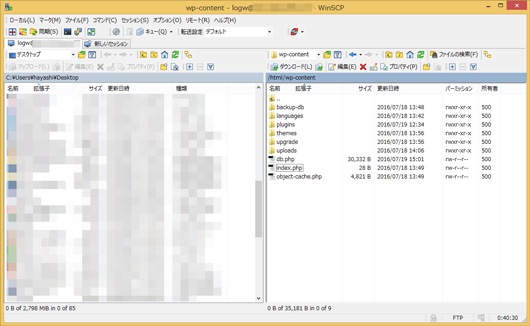
真っ白になりました。
Webサイトは真っ白になりました。db.phpを削除したら元に戻りました。php7だからなのかわかりませんが情報が古くてわかりませんでした原因は。とりあえず同じような症状の人がいたら教えていただけると助かります。
参考サイト
- http://higelog.brassworks.jp/680
- https://dogmap.jp/2013/10/28/wordpress-with-hyperdb/
- http://qiita.com/moonfish77/items/2afb2e5800f176a53d3a
この記事に関する技術サポート・ご相談
「手順通りにいかない」「自社環境への構築を代行してほしい」など、
インフラ・サーバー周りでハマった際はお気軽にご相談ください。
※ Googleフォームへ移動します(初回相談無料)
個人支援・寄付について
サイトラボでは個人支援・寄付を受けております。ご協力いただける方はお願いいたします。当サイトではビットコインで受け付けております。
- ビットコイン:3LHnADwZwUbic2L45EnVJEykiG6KfbqrwS